Home
The SnapperGPS Receiver
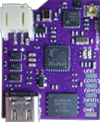
The SnapperGPS receiver is a small, low-cost, and low-power GNSS receiver for non-real-time wildlife tracking. It employs the snapshot GNSS technology, which offloads the computationally expensive data processing to the cloud, and:- Can operate for more than a year,
- Needs only 12 ms of signal reception for a fix,
- Employs multiple satellite systems for improved reliability (GPS, Galileo, and BeiDou),
- Achieves a median real-world tracking accuracy of about 12 m (before smoothing),
- Measures the temperature in addition,
- Is configured via USB in your browser without the need to install a driver or an app, and
- Is certified open-source hardware.
Workflow
- Get/build your SnapperGPS receiver.
- Configure your SnapperGPS receiver in your browser for your deployment.
- Deploy your SnapperGPS receiver.
- The SnapperGPS receiver captures GNSS snapshots according to your configuration.
- Recover your SnapperGPS receiver.
- Upload the data from your SnapperGPS receiver to our server.
- Download the track of your surveilled animal.
Troubleshooting
-
- Verify that your SnapperGPS receiver is not paired with another browser tab or window already.
- Check your browser version and ensure that it is among the ones that support the WebUSB technology.
- Unplug the USB-C cable from your SnapperGPS receiver and plug it in again, this time upside down.
- Make sure that your USB cable supports data transmission, i.e., is not a power-only cable.
- Avoid using a USB hub.
- If you use Linux such as Ubuntu, follow the steps in the next question.
- Try a host device from another vendor. For example, there are known problems with some OPPO smartphones.
-
- Create
/etc/udev/rules.d/50-SnapperGPS.rules, e.g. withsudo nano /etc/udev/rules.d/50-SnapperGPS.rules. - Add
SUBSYSTEM=="usb", ATTR{idVendor}=="10c4", MODE="666", GROUP="plugdev"andSUBSYSTEM=="usb", ATTRS{idVendor}=="10c4", ATTRS{idProduct}=="0002", DRIVER=="usbhid", ACTION=="add", ATTR{authorized}=="0". - Restart the device manager with
sudo service udev restart. - Plug in your SnapperGPS receiver again.
- Add your user account to the group with
sudo adduser your_username plugdev.
- Create
-
- Make sure that the antenna was outdoors and had a sufficient view of the sky at your selected start time.
- Check the connection between your antenna and your SnapperGPS receiver.
- Avoid proximity to electronic devices that emit electromagnetic waves such as WiFi routers or laptops when recording data.
- Do not replace the antenna too often. SnapperGPS's antenna connector is rated for only 30 mating cycles.
- Do not place the board on a conductive surface or put conducting materials directly on the board without isolation.
- Make sure that the battery was sufficiently charged during the deployment. Ideally, start long deployments at least 4.1 V for V1.0.0/V1.0.1 with LiPo or 3.0 V for V2.0.0 with button batteries.
- Check if you are operating in an area with high levels of GPS jamming, e.g. here.
- Verify that your provided start location was within 10 kilometres of the actual start location.
- Check that the configuration device clock is within 30 seconds of the actual time.
-
- Satellite position information used for processing can occasionally be imprecise when data are uploaded very soon after recording. Upload that data again tomorrow.
-
- Verify that your batteries did not completely discharge.
- Check if your SnapperGPS receiver got wet.
- A V1.0.0 receiver cannot record more than 10,901 locations; V1.0.1 and V2.0.0 have a limit of 21,824 locations.
- Be sure the start and end time on the configuration and upload pages were correctly set.
-
- Re-upload your data and set the Max. velocity to a smaller value. You can even try something like 0.01 m/s.
-
- If a receiver is connected and recognised, the green LED permanently glows.
- When interacting via the website, the red LED glows in addition.
- After unplugging a configured receiver with charge, the green LED flashes several times to indicate it will record soon.
- After unplugging an unconfigured receiver with charge, the red LED flashes several times before deep sleep.
- A configured receiver that has not started recording flashes both LEDs every five seconds.
- Each captured satellite snapshot causes one green flash.
- After the final snapshot, the red LED flashes several times before deep sleep.
-
- The app is fully functional in Edge or Chrome; there is no need to install it. The browser version even works offline unless the cache is cleared.
- A) Use the browser's “Add SnapperGPS to Home screen” prompt when available.
- B) Use the “Install SnapperGPS” app icon in the address bar when available.
- C) Use the browser menu and choose “Install app” (or Apps → Install SnapperGPS).
-
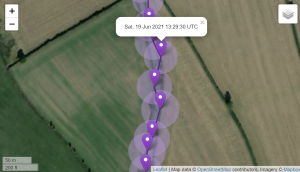
- Each location estimate can include an uncertainty estimate when downloaded as CSV or JSON.
- The uncertainty is a confidence radius in metres that is also shown on the map around the location estimate.
- A small value represents high confidence, a high value represents low confidence, and no value indicates a very uncertain fix.
- The original one-sigma interpretation corresponds to a 68% probability that the true location lies within the circle, although current receivers with proper antennas perform better in practice.
Resources
- SnapperGPS on GitHub, including more documentation.
- Our snapshot GNSS location estimation algorithms on GitHub.
- Exemplary GNSS data collected with SnapperGPS receivers in the public Oxford University Research Archive.
- More exemplary GNSS data collected with SnapperGPS receivers in the public Oxford University Research Archive.
- Flash your SnapperGPS receiver with custom firmware.
- View accelerometer measurements from your SnapperGPS accelerometer daughterboard.
Publications
2023
- Jonas Beuchert. 2023. SnapperGPS: Collection of GNSS Signal Snapshots 2. University of Oxford, Oxford, UK. http://dx.doi.org/10.5287/ora-xq5b8xva7.
- Jonas Beuchert, Amanda Matthes, and Alex Rogers. 2023. SnapperGPS: Open Hardware for Energy-Efficient, Low-Cost Wildlife Location Tracking with Snapshot GNSS. In Journal of Open Hardware, 7(1): 2, Pages 1–13. https://doi.org/10.5334/joh.48.
2022
- Amanda Matthes, Jonas Beuchert, Alasdair Davies, Juan Patino-Martinez, and Alex Rogers. 2022. SnapperGPS: Deployment of a low-cost snapshot GNSS receiver to track loggerhead sea turtles. In 40th International Sea Turtle Symposium (ISTS40), March, 2022, Perth, Australia. https://ora.ox.ac.uk/objects/uuid:c9acf083-d5e5-4265-8425-67509c5e3b9b.
2021
- Amanda Matthes and Jonas Beuchert. 2021. Can we locate endangered sea turtles using twelve milliseconds of noisy satellite signals? In Inspired Research: News from the Department of Computer Science, University of Oxford. Oxford, UK, Issue 19 (Winter 2021), Pages 20-21. https://www.cs.ox.ac.uk/innovation/inspiredresearch/InspiredResearch-winter2021.pdf.
- Jonas Beuchert and Alex Rogers. 2021. SnapperGPS: Algorithms for Energy-Efficient Low-Cost Location Estimation Using GNSS Signal Snapshots. In SenSys ’21: ACM Conference on Embedded Networked Sensor Systems, November, 2021, Coimbra, Portugal. ACM, New York, NY, USA, Pages 165-177. https://doi.org/10.1145/3485730.3485931.
- Jonas Beuchert and Alex Rogers. 2021. SnapperGPS: Collection of GNSS Signal Snapshots. University of Oxford, Oxford, UK. https://doi.org/10.5287/bodleian:eXrp1xydM.